'%20fill='%23fff'%3e%3cpath%20d='M24%20364.337V24h141.909c25.481%200%2046.833%203.601%2064.056%2010.803%2017.222%207.191%2030.183%2017.279%2038.882%2030.24s13.049%2027.972%2013.049%2045.041c0%2012.961-2.72%2024.513-8.148%2034.645-5.429%2010.142-12.906%2018.534-22.431%2025.174-9.526%206.651-20.548%2011.299-33.069%2013.953v3.325c13.732.661%2026.451%204.383%2038.134%2011.134%2011.684%206.762%2021.077%2016.155%2028.168%2028.17%207.092%2012.025%2010.638%2026.231%2010.638%2042.628%200%2018.281-4.647%2034.601-13.952%2048.939-9.305%2014.35-22.762%2025.648-40.381%2033.908-17.607%208.248-38.992%2012.377-64.143%2012.377H24zm82.258-200.414h45.534c8.975%200%2016.947-1.497%2023.929-4.493s12.432-7.312%2016.374-12.961c3.931-5.65%205.902-12.466%205.902-20.439%200-11.409-4.041-20.384-12.135-26.926-8.082-6.53-18.995-9.801-32.738-9.801h-46.866v74.62zm0%20134.109h50.853c17.839%200%2030.987-3.381%2039.466-10.131%208.479-6.762%2012.708-16.178%2012.708-28.247%200-8.755-2.049-16.309-6.145-22.686-4.096-6.365-9.922-11.298-17.443-14.789-7.532-3.491-16.561-5.231-27.089-5.231h-52.339v81.095l-.011-.011zM388.865%2024v340.337h-81.256V24h81.256zm181.618%20230.159V109.082h81.091v255.255h-77.435v-47.529h-2.665c-5.649%2015.616-15.263%2028.004-28.829%2037.145-13.578%209.14-29.941%2013.71-49.102%2013.71-17.398%200-32.683-3.986-45.864-11.97-13.181-7.973-23.433-19.14-30.745-33.489s-11.023-31.165-11.133-50.437V109.082h81.256v146.739c.11%2013.854%203.766%2024.767%2010.968%2032.74s17.002%2011.96%2029.413%2011.96c8.082%200%2015.372-1.795%2021.847-5.407%206.486-3.601%2011.628-8.865%2015.45-15.781%203.821-6.927%205.737-15.318%205.737-25.174h.011zm224.376%20115.002c-26.704%200-49.718-5.286-69.044-15.869-19.337-10.583-34.181-25.703-44.532-45.371-10.362-19.668-15.537-43.069-15.537-70.215s5.208-49.445%2015.614-69.212c10.418-19.779%2025.096-35.174%2044.037-46.197s41.261-16.53%2066.962-16.53c18.17%200%2034.787%202.83%2049.851%208.48s28.08%2014.007%2039.048%2025.086%2019.501%2024.734%2025.591%2040.966%209.14%2034.81%209.14%2055.756v20.273H694.145v-47.199h146.226c-.11-8.633-2.159-16.342-6.145-23.104s-9.448-12.047-16.374-15.869-14.866-5.726-23.841-5.726-17.233%202.015-24.424%206.057c-7.202%204.052-12.906%209.537-17.112%2016.452-4.207%206.927-6.431%2014.757-6.652%2023.512v48.025c0%2010.417%202.049%2019.525%206.145%2027.332s9.911%2013.876%2017.454%2018.193c7.532%204.317%2016.506%206.486%2026.924%206.486%207.201%200%2013.731-1.002%2019.612-2.995%205.869-1.993%2010.912-4.923%2015.119-8.81%204.206-3.876%207.367-8.645%209.47-14.294l74.616%202.158c-3.105%2016.728-9.889%2031.264-20.361%2043.62s-24.182%2021.937-41.129%2028.743c-16.947%206.816-36.559%2010.219-58.825%2010.219l.011.033z'/%3e%3c/g%3e%3cdefs%3e%3cclipPath%20id='A'%3e%3cpath%20fill='%23fff'%20transform='translate(24%2024)'%20d='M0%200h892v345.161H0z'/%3e%3c/clipPath%3e%3c/defs%3e%3c/svg%3e)
How We Replaced Our Search Engine With a Cache
We killed MeiliSearch and moved search entirely to the browser. It's faster, simpler, and free.
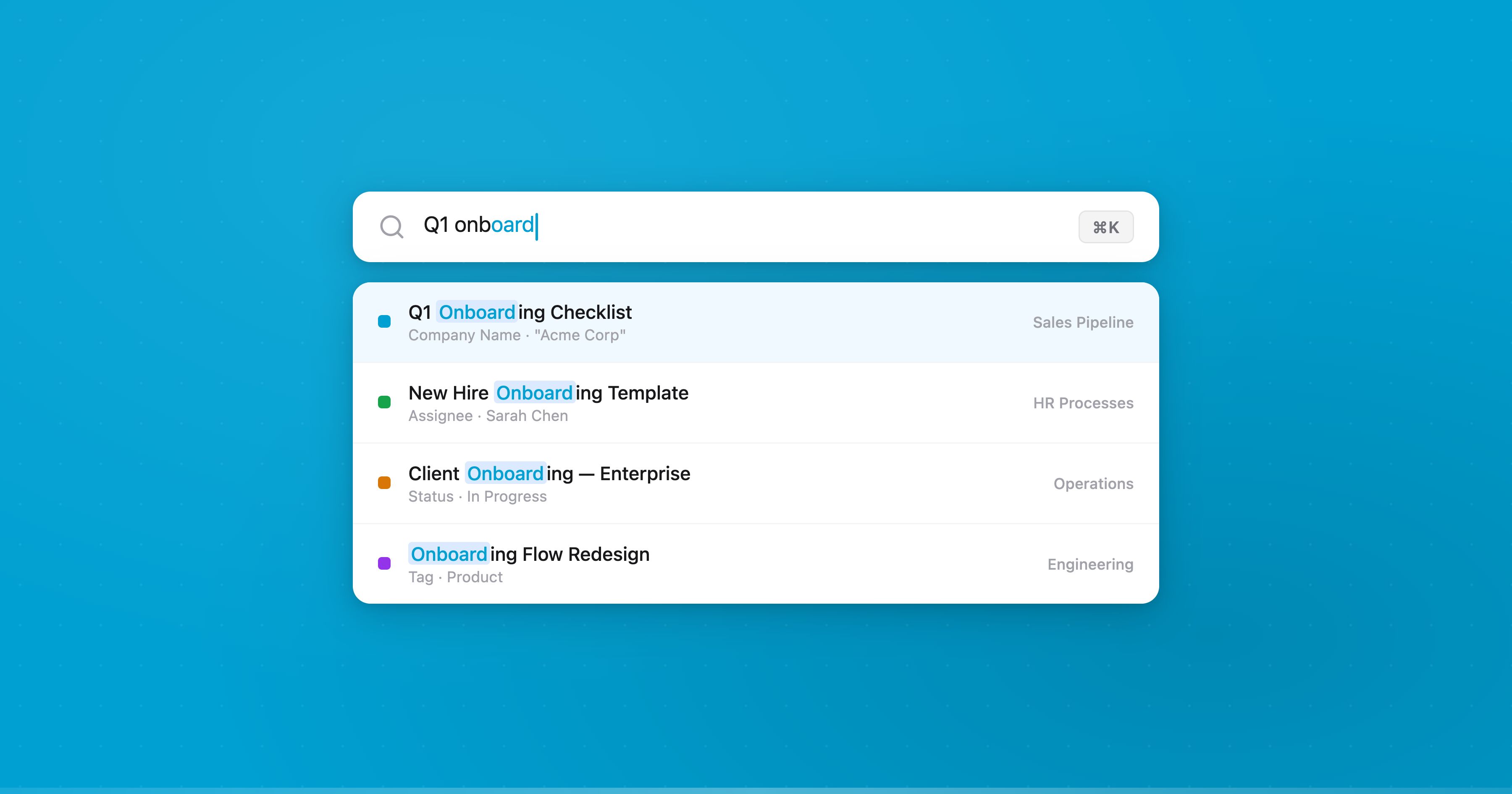
We used to run MeiliSearch for full-text search across Blue. It indexed hundreds of gigabytes of records from our MySQL database, kept (or tried to keep) itself in sync, and gave users instant search results across their workspaces.
Then we built a custom frontend cache for performance reasons — and realized we didn’t need a search engine anymore.
Today, every search in Blue happens entirely in the browser. No server round-trip. No search index to sync. No separate service to operate. A dedicated Web Worker runs Fuse.js against records already sitting in memory, and returns results in milliseconds.
This post is about how we got there, what was wrong with the “proper” approach, and why your cache might be your best search index too.
The problem with MeiliSearch
MeiliSearch is a good piece of software. For small datasets with infrequent updates, it’s genuinely delightful — fast to set up, fast to query, great typo tolerance out of the box. Our problems started when we tried to run it at scale for a production SaaS serving thousands of companies.
Sync was the first crack. MeiliSearch has no native database sync. There’s no built-in CDC (Change Data Capture), no official MySQL connector — nothing like Elasticsearch’s Logstash or Debezium ecosystem. You’re on your own. We used a community-maintained sync tool that read from MySQL binlog, but it was fragile. The index would fall behind for hours during high-write periods. Users would create a record, search for it, and get nothing. That’s a trust-destroying experience.
Memory was the second. MeiliSearch uses LMDB under the hood, which memory-maps the entire index. In practice, it consumes as much RAM as the OS makes available. The --max-indexing-memory flag? Frequently ignored. We hit OOM kills regularly. In Docker, it would read the host’s total memory instead of the container limit, then try to use two-thirds of it. For a database our size, the storage amplification alone was significant — a 10MB source document becomes roughly 200MB of indexed storage.
Stability was the third. Under load, MeiliSearch would sometimes stop responding entirely. Not slow — unresponsive. CPU pinned at 100%, no API responses. We saw reports of the same pattern from others running it at scale: services becoming unavailable multiple times a day, task database corruption during upgrades, the index freezing during large document ingestion.
All of this on a three-person engineering team. Every hour spent babysitting a search service was an hour not spent building the product. And the kicker: MeiliSearch’s open-source edition is single-node only. No replication, no failover, no horizontal scaling. If the node goes down, search goes down.
We tolerated it because search felt like a problem that required a search engine. That assumption turned out to be wrong.
The cache changed everything
When we rebuilt our frontend data layer, the goal was performance — instant workspace switching, sub-100ms loads from IndexedDB, background sync via Web Workers. Search wasn’t part of the plan.
But once the cache was working, we noticed something obvious: every record in a user’s workspace was already sitting in memory. Titles, descriptions, custom field values, tags, assignees — all normalized, all indexed by workspace, all instantly accessible. The data MeiliSearch was indexing from MySQL was the same data the browser already had.
The question stopped being “how do we make MeiliSearch work better” and became “why are we running MeiliSearch at all?”
Building search in days, not months
The actual implementation took days. The hard work — building the cache, the Web Worker infrastructure, the phased loading system — was already done. Search was just a new consumer of data that already existed.
The architecture is simple. A dedicated search Web Worker holds a Fuse.js index. As records load into the cache (during both initial fetch and background sync), they’re simultaneously fed to the search worker. The worker accepts four message types: init, add, remove, and search. Results come back with match metadata for highlighting.
Here’s the Fuse.js configuration:
const fuse = new Fuse(records, {
  keys: ['title', 'todoList.title', 'description', 'fields.value'],
  threshold: 0.2,
  ignoreLocation: true,
  includeMatches: true,
  minMatchCharLength: 3,
})
threshold: 0.2 keeps results tight — close matches only, no noise. ignoreLocation: true means a match anywhere in the string counts, not just the beginning. We search across record titles, descriptions, the workspace name, and custom field values.
Each record is normalized into a search-specific shape before indexing:
interface SearchRecord {
  id: string
  title: string
  description?: string
  fields?: { name: string; value: string }[]
  todoList: {
    id: string
    title: string
    project?: { id: string; name: string; slug: string }
  }
}
Custom field extraction handles every searchable field type — text, email, phone, URL, numbers, select fields, countries, locations, references. Non-searchable types like dates, checkboxes, and files are excluded. This extraction runs twice: once during Phase 1 (core record fields) and again during Phase 2 (enriched custom field data), so users can search before all data has loaded and get progressively better results.
The search UI
Global search is triggered with Cmd+K. It searches across five layers simultaneously:
- Records — fuzzy search via the Web Worker, with match highlighting and context snippets
- Workspaces — fuzzy match on workspace names
- Organizations — fuzzy match across all orgs the user belongs to
- Navigation — settings, accounts, shortcuts, theme options
- Quick links — docs, API, notifications (shown when the search field is empty)
Results show which field matched and a snippet of the surrounding context. If you search “acme” and it matches a custom field called “Company Name” on a record titled “Q1 Review”, you see the record title, the field name, and the highlighted match — all computed client-side from match metadata Fuse.js returns.
Keyboard navigation works the way you’d expect: arrow keys to move, Enter to open, Escape to close. The first result is auto-selected on every keystroke.
Duplicate detection for free
Once the search index existed, duplicate detection was trivial. When a user types a new record title, we run it against every record in the current workspace:
const fuse = new Fuse(records, {
  keys: ['title'],
  threshold: 0.4,
  includeScore: true,
  ignoreLocation: true,
})
A higher threshold (0.4 vs 0.2) catches looser matches. Fuse returns a score from 0 (perfect match) to 1 (no match), which we invert to a percentage: a score of 0.3 becomes “70% similar.” If matches are found, the user sees them before creating the record — with options to open the existing record, create anyway, or cancel.
This runs in real-time as they type. No server call. No separate service. Just the cache doing double duty.
What we gained
Speed. Search results appear as you type, in the same frame. No network latency. No waiting for an index to be queried. The Fuse.js worker returns results in single-digit milliseconds for workspaces with tens of thousands of records.
Reliability. There is no sync lag because there is no sync. The search index is the cache. When a record is created, it’s in the index immediately — not after a binlog consumer processes it and MeiliSearch ingests it.
Simplicity. We eliminated an entire service from our infrastructure. No MeiliSearch server to provision, monitor, restart after OOM kills, or upgrade carefully to avoid task database corruption. No sync pipeline to maintain. No secondary storage eating hundreds of gigabytes of disk.
Cost. MeiliSearch was running on its own server. That server is gone. The search computation happens on the user’s device, distributed across every browser that opens Blue. The most efficient infrastructure is the infrastructure you don’t run.
Features. Duplicate detection, instant filtering, client-side views — none of these were practical with a server-round-trip model. When the full dataset lives in memory, new features that query it are nearly free to build.
When this doesn’t work
To be clear: this approach works because of how Blue’s data is structured. Each workspace is a self-contained unit. A user only ever searches within workspaces they have access to, and the cache already holds all records for those workspaces. If you’re building a search experience across millions of documents that no single user would ever load entirely — a marketplace, a social feed, a document search engine — you need server-side search. That’s what Elasticsearch and MeiliSearch are for.
But for SaaS products where each customer’s data fits in the browser’s memory? The question is worth asking: do you actually need a search service, or do you already have the data?
The meta-lesson
The conventional wisdom is that search is a hard problem requiring specialized infrastructure. And it can be. But we spent months operating a separate search service with sync pipelines, memory tuning, and monitoring — when the answer was already sitting in the browser’s memory.
In the age of AI, prototyping alternatives is cheap. We used Claude Code to build the initial search worker, iterate on the Fuse.js configuration, and wire up the field extraction logic. The whole thing was working in days. A year ago, the “safe” choice would have been to stick with MeiliSearch and keep fighting it. Today, the cost of trying the simple thing first is so low that there’s no reason not to.
Sometimes the best solution isn’t the proper one. Sometimes it’s the obvious one that was already there.
— Manny