'%20fill='%23fff'%3e%3cpath%20d='M24%20364.337V24h141.909c25.481%200%2046.833%203.601%2064.056%2010.803%2017.222%207.191%2030.183%2017.279%2038.882%2030.24s13.049%2027.972%2013.049%2045.041c0%2012.961-2.72%2024.513-8.148%2034.645-5.429%2010.142-12.906%2018.534-22.431%2025.174-9.526%206.651-20.548%2011.299-33.069%2013.953v3.325c13.732.661%2026.451%204.383%2038.134%2011.134%2011.684%206.762%2021.077%2016.155%2028.168%2028.17%207.092%2012.025%2010.638%2026.231%2010.638%2042.628%200%2018.281-4.647%2034.601-13.952%2048.939-9.305%2014.35-22.762%2025.648-40.381%2033.908-17.607%208.248-38.992%2012.377-64.143%2012.377H24zm82.258-200.414h45.534c8.975%200%2016.947-1.497%2023.929-4.493s12.432-7.312%2016.374-12.961c3.931-5.65%205.902-12.466%205.902-20.439%200-11.409-4.041-20.384-12.135-26.926-8.082-6.53-18.995-9.801-32.738-9.801h-46.866v74.62zm0%20134.109h50.853c17.839%200%2030.987-3.381%2039.466-10.131%208.479-6.762%2012.708-16.178%2012.708-28.247%200-8.755-2.049-16.309-6.145-22.686-4.096-6.365-9.922-11.298-17.443-14.789-7.532-3.491-16.561-5.231-27.089-5.231h-52.339v81.095l-.011-.011zM388.865%2024v340.337h-81.256V24h81.256zm181.618%20230.159V109.082h81.091v255.255h-77.435v-47.529h-2.665c-5.649%2015.616-15.263%2028.004-28.829%2037.145-13.578%209.14-29.941%2013.71-49.102%2013.71-17.398%200-32.683-3.986-45.864-11.97-13.181-7.973-23.433-19.14-30.745-33.489s-11.023-31.165-11.133-50.437V109.082h81.256v146.739c.11%2013.854%203.766%2024.767%2010.968%2032.74s17.002%2011.96%2029.413%2011.96c8.082%200%2015.372-1.795%2021.847-5.407%206.486-3.601%2011.628-8.865%2015.45-15.781%203.821-6.927%205.737-15.318%205.737-25.174h.011zm224.376%20115.002c-26.704%200-49.718-5.286-69.044-15.869-19.337-10.583-34.181-25.703-44.532-45.371-10.362-19.668-15.537-43.069-15.537-70.215s5.208-49.445%2015.614-69.212c10.418-19.779%2025.096-35.174%2044.037-46.197s41.261-16.53%2066.962-16.53c18.17%200%2034.787%202.83%2049.851%208.48s28.08%2014.007%2039.048%2025.086%2019.501%2024.734%2025.591%2040.966%209.14%2034.81%209.14%2055.756v20.273H694.145v-47.199h146.226c-.11-8.633-2.159-16.342-6.145-23.104s-9.448-12.047-16.374-15.869-14.866-5.726-23.841-5.726-17.233%202.015-24.424%206.057c-7.202%204.052-12.906%209.537-17.112%2016.452-4.207%206.927-6.431%2014.757-6.652%2023.512v48.025c0%2010.417%202.049%2019.525%206.145%2027.332s9.911%2013.876%2017.454%2018.193c7.532%204.317%2016.506%206.486%2026.924%206.486%207.201%200%2013.731-1.002%2019.612-2.995%205.869-1.993%2010.912-4.923%2015.119-8.81%204.206-3.876%207.367-8.645%209.47-14.294l74.616%202.158c-3.105%2016.728-9.889%2031.264-20.361%2043.62s-24.182%2021.937-41.129%2028.743c-16.947%206.816-36.559%2010.219-58.825%2010.219l.011.033z'/%3e%3c/g%3e%3cdefs%3e%3cclipPath%20id='A'%3e%3cpath%20fill='%23fff'%20transform='translate(24%2024)'%20d='M0%200h892v345.161H0z'/%3e%3c/clipPath%3e%3c/defs%3e%3c/svg%3e)
How We Handle Database Backups
A three-tier backup system, automatic failover, and the split-brain problem — all managed by three engineers.
When we migrated off AWS Aurora, the biggest question wasn’t performance or cost — it was whether we could trust ourselves with our own data.
Aurora handled backups automatically. Point-in-time recovery, automated snapshots — it all just worked. We never thought about it. But as our database grew past 150GB and costs scaled accordingly, “not thinking about it” became expensive. We were paying a significant premium for managed infrastructure that, as it turned out, we could build ourselves.
The goal was clear: replicate the reliability guarantees of a managed database service — automated backups, replication, failover, point-in-time recovery — on our own hardware, defined entirely in code, for a fraction of the cost. And critically: set it and forget it. We’re three engineers building a product. We don’t want to think about backups. We want to ship features and sleep at night knowing our data is safe.
This is how we built it.
The three-tier backup system
We run Percona XtraBackup on a three-tier schedule, with all backups stored offsite on Backblaze B2.
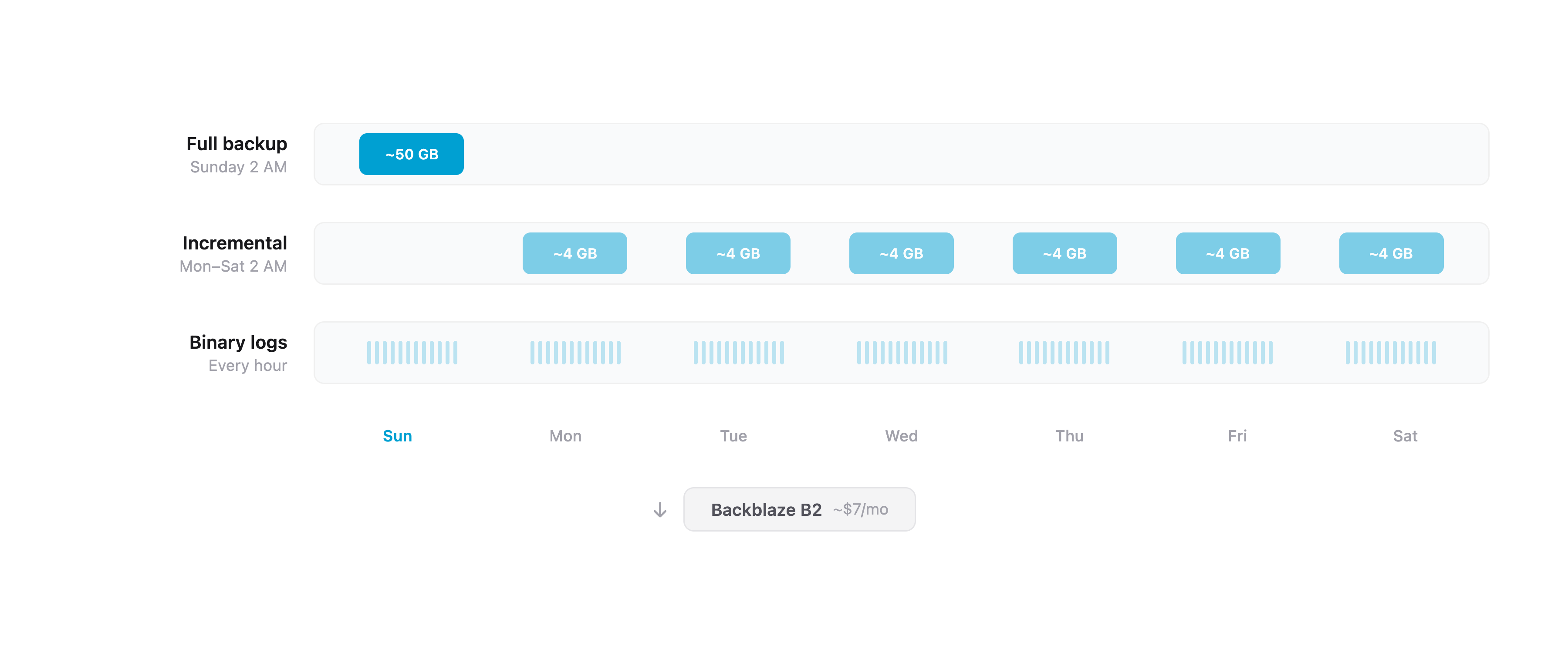
Tier 1: Weekly full backups. Every Sunday at 2 AM (Germany time), XtraBackup takes a complete physical backup of the database. It streams the backup through lz4 compression and uploads directly to B2. A 150GB database compresses to roughly 40-60GB. The whole process takes 5-10 minutes.
Tier 2: Daily incremental backups. Monday through Saturday at 2 AM, XtraBackup takes an incremental backup — only pages that changed since the last backup. These are typically 2-10GB depending on write volume, and complete in 1-5 minutes. Each incremental chains back to the last full backup.
Tier 3: Hourly binary log backups. Every hour, rclone syncs MySQL’s binary logs to B2. Binary logs record every write operation in order. Combined with a full or incremental backup, they allow point-in-time recovery to any second — not just to the last backup window.
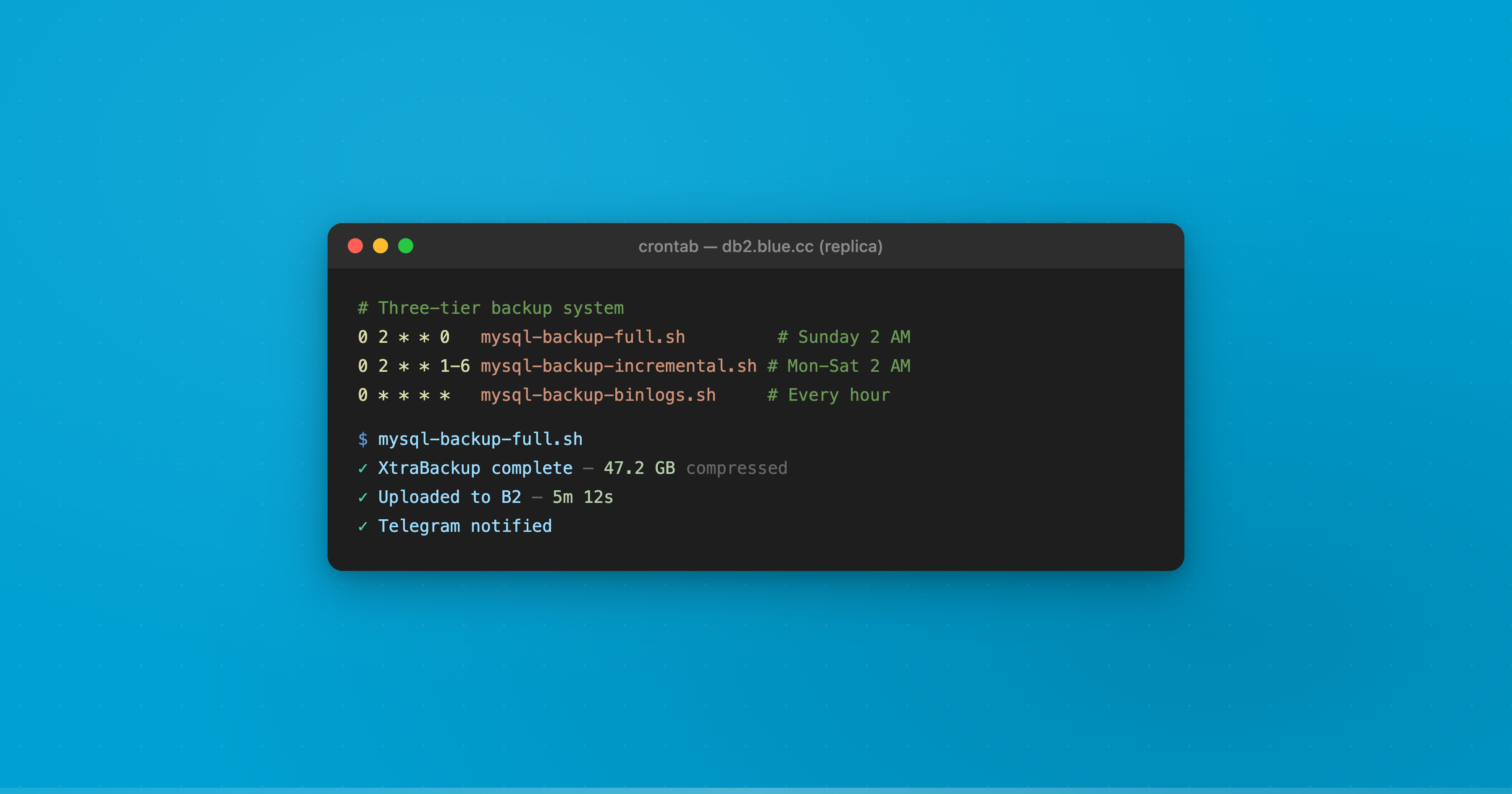
The cron schedule on each database server:
0 2 * * 0    /usr/local/bin/mysql-backup-full.sh          # Sunday 2 AM
0 2 * * 1-6  /usr/local/bin/mysql-backup-incremental.sh    # Mon-Sat 2 AM
0 * * * *    /usr/local/bin/mysql-backup-binlogs.sh        # Every hour
0 4 * * *    /usr/local/bin/mysql-backup-cleanup.sh         # Daily 4 AM
Retention policy
- Last 30 days: Every daily backup (full + incrementals) is kept
- 30-90 days: Only Sunday full backups are retained (weekly snapshots for 12 weeks)
- Binary logs: 14 days locally (MySQL auto-expires), 30 days on B2
An automated cleanup script enforces this at 4 AM daily, removing expired backups from B2. Total storage cost: roughly $6-8 per month on Backblaze B2.
Replica-only execution
Here’s a design detail that matters: backup scripts run on both database servers, but they auto-detect which server is the replica by checking MySQL’s @@read_only status. Only the replica actually executes the backup. If we fail over and the roles swap, the next backup automatically runs on the new replica. No manual intervention, no reconfiguration.
This means backups never impact the primary server’s performance, and failover doesn’t break the backup schedule.
Replication
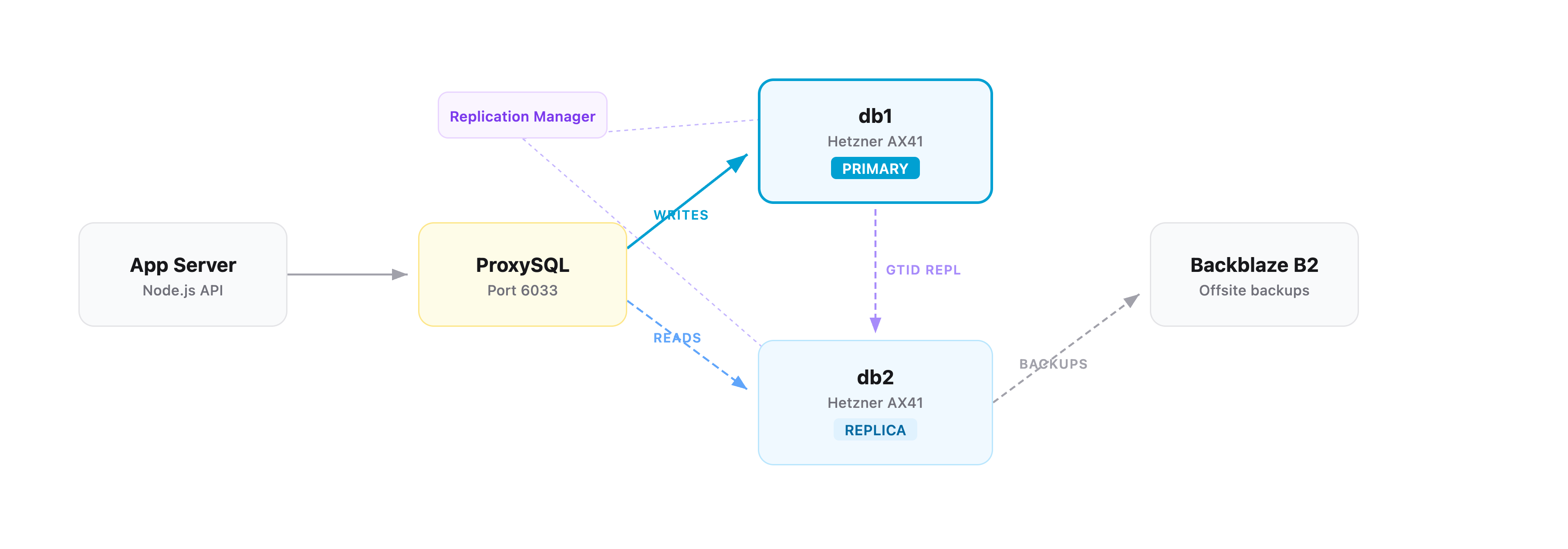
We run two dedicated database servers on Hetzner (AX41-NVMe — 6-core Ryzen, 64GB RAM, dual 512GB NVMe in RAID 1), connected over a private VLAN. Replication uses MySQL’s GTID (Global Transaction Identifiers) mode with semi-synchronous replication.
Why GTID: Traditional MySQL replication tracks position in binary log files — if the primary fails, figuring out where the replica left off requires matching file names and byte offsets. GTID assigns a unique ID to every transaction. The replica knows exactly which transactions it has and which it’s missing. This makes failover deterministic rather than a guessing game.
Why semi-synchronous: In standard async replication, the primary commits a transaction and moves on — the replica might be seconds behind. Semi-sync replication waits for the replica to confirm it has written the transaction to its relay log before the primary returns success to the client. If the primary crashes, the replica has every committed transaction. The tradeoff is a small latency increase per write (our timeout is 10 seconds before falling back to async), but the durability guarantee is worth it.
ProxySQL sits on our application server and handles read/write routing automatically. It monitors the read_only flag on each MySQL server every 2 seconds:
read_only=OFF→ writer hostgroup (receivesINSERT,UPDATE,DELETE)read_only=ON→ reader hostgroup (receivesSELECT)
The application connects to ProxySQL on port 6033 as if it were a single MySQL server. It has no idea there are two database servers behind it. All routing decisions happen transparently.
Automatic failover and the split-brain problem
Replication Manager monitors both database servers every 5 seconds. If the primary doesn’t respond for 30 seconds (plus a 10-second false-positive tolerance window), it triggers automatic failover: the replica is promoted to primary, ProxySQL re-routes traffic, and the application continues without manual intervention. Total detection-to-recovery time is roughly 40 seconds.
This sounds straightforward, but there’s a problem that makes database failover genuinely dangerous: split-brain.
What is split-brain
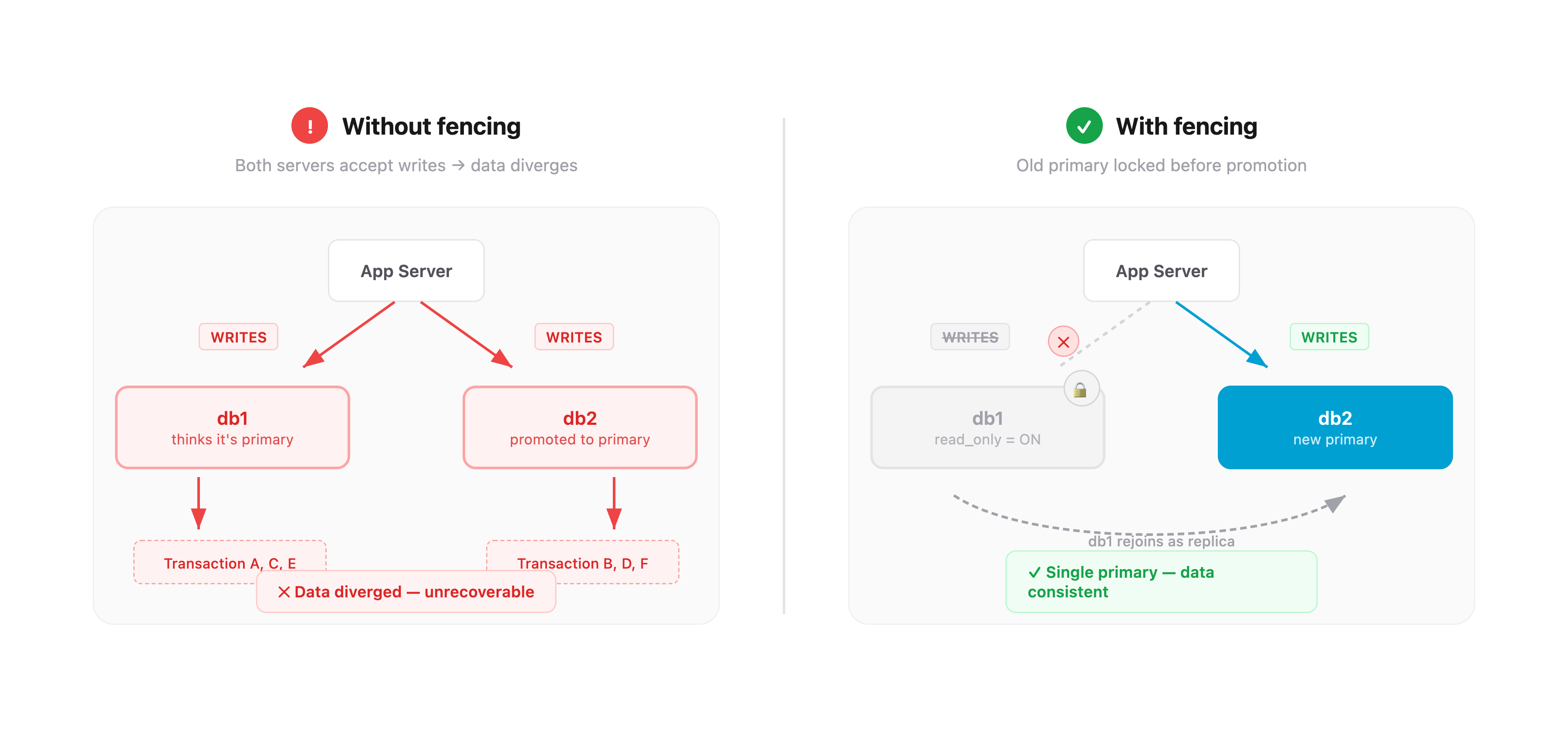
Imagine this scenario: the primary server becomes unreachable — but it’s not actually dead. Maybe there’s a network partition. Maybe it’s under heavy load and stopped responding to health checks. Replication Manager declares it dead and promotes the replica.
Now you have two servers that both think they’re the primary. Both are accepting writes. Both are accumulating transactions that the other server doesn’t have. When the “dead” server comes back, you have two divergent copies of your database with conflicting data. This is split-brain, and it’s one of the most destructive failure modes in distributed systems. There is no automatic way to merge two divergent write streams. You lose data.
How we prevent it
The solution is fencing — before promoting the replica, you must guarantee the old primary cannot accept writes.
Our fencing script runs before any promotion. It connects directly to the old primary over the private VLAN and sets two flags:
SET GLOBAL read_only = ON;
SET GLOBAL super_read_only = ON;
read_only blocks normal write queries. super_read_only blocks writes even from users with SUPER privilege — a belt-and-suspenders measure. Once these are set, the old primary physically cannot accept writes, even if it’s still running. ProxySQL detects the read_only change within 2 seconds and stops routing writes to it.
Only after fencing succeeds does Replication Manager promote the replica. The old primary can then safely rejoin as a replica, replicate the transactions it missed, and resume its role.
If fencing fails — the old primary is truly unreachable and can’t be fenced — the failover still proceeds, but the situation is flagged. When the old primary eventually comes back, it starts in read_only mode (our default boot configuration) and cannot accept writes until Replication Manager explicitly assigns it a role.
This layered approach — fencing before promotion, read-only boot default, ProxySQL health monitoring — means split-brain requires multiple independent safety mechanisms to fail simultaneously.
Monitoring
Every backup and every failure sends a Telegram notification to our team channel. Not email that gets buried — Telegram, which we actually read.
Success notifications include the backup type, compressed size, duration, and hostname. We glance at these daily. If one doesn’t show up, something’s wrong.
Failure alerts fire on:
- Any backup script failure
- B2 upload failure
- No successful backup in 25+ hours
- Two or more consecutive binlog sync failures
- Backup size anomalies (full backup suspiciously small, or incremental suspiciously large relative to the last full)
The size anomaly check is subtle but important. If a full backup is under 20GB when the database is 150GB, something went wrong even if the script exited cleanly. If an incremental is more than 80% the size of the last full, something unusual happened with write volume that’s worth investigating.
Replication Manager has its own monitoring: replication lag alerts, failover event notifications, and service health checks. Together, we have visibility into the entire data pipeline without logging into anything.
Recovery scenarios
Having backups means nothing if you can’t restore from them. Here’s what recovery looks like for each failure mode:
| Scenario | Recovery time | Data loss |
|---|---|---|
| Accidental deletion (point-in-time recovery) | 20-40 min | 0 seconds |
| Single server failure | 30-60 min | 0-1 hour |
| Full datacenter loss (restore from B2) | 2-4 hours | 0-1 hour |
| Catastrophic loss (both servers + binlog sync failed) | 1-2 hours | Up to 24 hours |
The key variable is binary logs. In any scenario where binlogs survive — on the surviving server, or already synced to B2 — we get point-in-time recovery to any second. Accidentally dropped a table at 3:47:22 PM? Restore the last full backup, apply incrementals, replay binary logs up to 3:47:21 PM. The table is back, with every row intact. The catastrophic scenario — both servers gone and the last binlog sync also failed — is the only case where we fall back to the last daily backup. That’s why the binlogs sync hourly: it shrinks the worst-case data loss window from 24 hours to 1 hour in all but the most extreme failures.
Testing failover
We wrote a 1,000+ line failover test suite that validates the entire system:
- Fencing test — verifies the fencing script correctly sets
read_onlyandsuper_read_onlyon the target server - Primary failure test — kills the primary, confirms automatic promotion happens, verifies ProxySQL re-routes traffic
- Replica failure test — kills the replica, confirms the primary continues serving reads and writes
- Controlled switchover test — graceful role swap with zero downtime
Each test includes pre-flight checks (replication healthy, both servers reachable, ProxySQL routing correctly) and post-test validation (correct server roles, replication re-established, no data loss).
We haven’t had a real production incident yet — the system hasn’t been tested by fire. But the failover test suite gives us confidence that when it happens, the automation will handle it. The alternative — finding out your failover doesn’t work during an actual outage — is not a position we want to be in.
Everything is code
Every piece of this infrastructure is defined in Ansible playbooks, checked into Git. The MySQL configuration, backup scripts, cron schedules, ProxySQL rules, Replication Manager config, fencing scripts, Telegram notifications — all of it. If both database servers disappeared tomorrow, we could provision two new ones and run the playbooks. The entire stack would be back, configured identically, in under an hour.
This was a deliberate philosophical choice. We don’t SSH into servers and edit config files. We don’t click around dashboards. We change a variable in Ansible, run the playbook, and the change is applied, versioned, and reproducible.
Claude Code was instrumental in building this. We used it extensively to write the Ansible playbooks, design the XtraBackup scripts, configure GTID replication, work through ProxySQL routing rules, and — most critically — understand and implement the fencing logic for split-brain prevention. None of us had deep experience with database replication or failover systems. AI bridged that gap and let us build something we couldn’t have built alone.
Was it worth it
We went from a managed database service that cost us thousands a month to a self-hosted setup that costs a fraction of that — with better performance, full point-in-time recovery, automatic failover, and complete visibility into how everything works.
The total infrastructure: two Hetzner dedicated servers, Backblaze B2 for offsite backups, Ansible for automation, Replication Manager for failover, ProxySQL for routing. Monthly cost for offsite backup storage: under $10.
More importantly, we understand our backup system. We know what happens when a server dies. We know where our data is, how it’s replicated, and how to get it back. When you’re running a platform that thousands of companies depend on for their daily operations, “I don’t know how our backups work, the cloud provider handles it” isn’t confidence — it’s hope.
We’d rather have confidence.
— Manny